
I have a need for using Custom DNS Servers in my VPC instead of the VPC Provided DNS endpoint. I recently stumbled across this interesting behaviour when trying to mount an EFS Share.
Let’s take a look at this example VPC below:
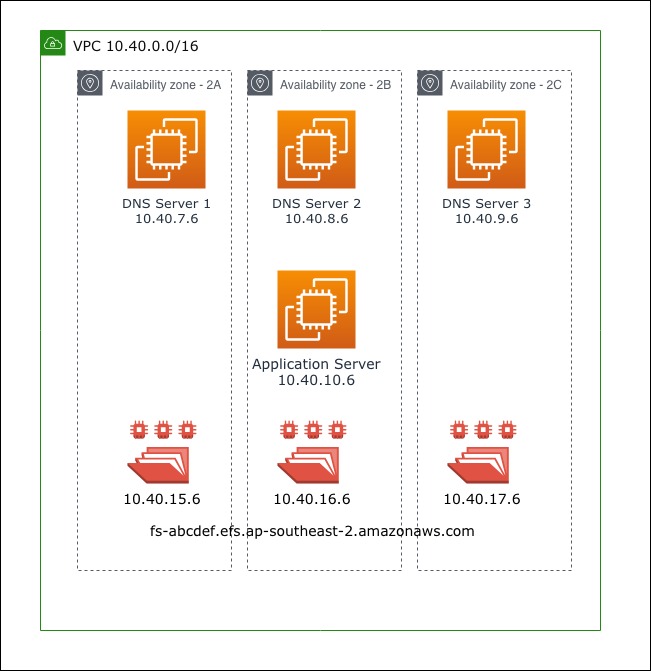
- I use 3 custom DNS Servers (BIND) instead of the VPC Provided DNS (10.40.0.2)
- My VPC DHCP Option Set points to these DNS servers
- The BIND servers are configured to forward *.amazonaws.com to the VPC Provided DNS resolver 10.40.0.2
- I create an EFS File System and create the targets across all 3 AZs for High Availability
- EFS gives me a DNS of fs-abcdef.efs.ap-southeast-2.amazonaws.com that I can use for mounting
- I launch an Application Server (EC2) in AZ-B which I will use for mounting the file system
I use the following command on the application server to mount the file system:
sudo mount -t nfs4 -o nfsvers=4.1,rsize=1048576,wsize=1048576,hard,timeo=600,retrans=2,noresvport fs-abcdef.efs.ap-southeast-2.amazonaws.com:/ efsI assumed that it would mount the EFS target in Availability Zone B as that’s where the application server resides. However, it had mounted the EFS Target in Availability Zone A (to my surprise).
When I attempt to do a nslookup of the EFS DNS endpoint on the application server, it returned the ip address of the target located in AZ-A!
nslookup fs-abcdef.efs.ap-southeast-2.amazonaws.com
Server:		10.40.7.6
Address:	10.40.7.6#53

Non-authoritative answer:
Name:	fs-abcdef.efs.ap-southeast-2.amazonaws.com
Address: 10.40.15.6
When I perform a nslookup against the VPC Provided DNS, it returns the target located in the same AZ as the application server
nslookup fs-abcdef.efs.ap-southeast-2.amazonaws.com 10.40.0.2
Server:		10.40.0.2
Address:	10.40.0.2#53

Non-authoritative answer:
Name:	fs-abcdef.efs.ap-southeast-2.amazonaws.com
Address: 10.40.16.6
After a lot of analysis and investigation, I managed to figure out what was happening:
- The VPC Provided DNS (10.40.0.2) will return the result based on the AZ where the DNS request is originating from
- The Application Server will always attempt to use the Primary DNS Server (10.40.7.6) for resolving DNS queries
- Given that the Primary DNS server lives in AZ-A, the VPC Provided DNS (10.40.0.2) will always return the ip address of the file system target located in AZ-A
So, what options do you have? You definitely want to avoid mounting a file system target across AZs for two reasons: performance and Cross-AZ data charges.
Solution:
You can mount the file system target using the ip address instead of the DNS name. I have not come across a scenario where the ip address of the file system id has changed post its creation.
This option however presents a challenge if the application server is part of an Auto Scaling Group or if you want to automate the process of mounting the file system. How do you tell the application server to use the VPC Provided DNS for querying the EFS mount point when mounting?
I use the following Ansible task as part of the userdata script that will resolve the EFS mount point against the VPC Provided DNS and mount the target:
---
- name: Mount File System
  hosts: localhost
  gather_facts: false
  tasks:

    - name: Install tools for AWS EFS
      yum: name={{item}} state=present
      become: true
      with_items:
        - "amazon-efs-utils"
        - "python-dns"

    - set_fact:
        target_ip: "{{ lookup('dig', '{{ file_system_id }}.efs.ap-southeast-2.amazonaws.com', '@{{ vpc_dns_resolver }}') }}"

    - name: Create mount directory
      become: true
      file:
        path: "{{ mount_partition }}"
        state: directory
        owner: root
        group: root
        mode: 0755

    - name: Mount EFS volume
      mount:
        name: "{{ mount_partition }}"
        src: "{{ target_ip }}:/"
        fstype: nfs4
        opts: nfsvers=4.1,rsize=1048576,wsize=1048576,hard,timeo=600,retrans=2,noresvport
        state: mounted
 Cloud Engineer